9-Layer Bypass
Active protection matrix
99.8% Success
Zero manual erasures
ClipShield Desktop Dashboard (Light SaaS UI)
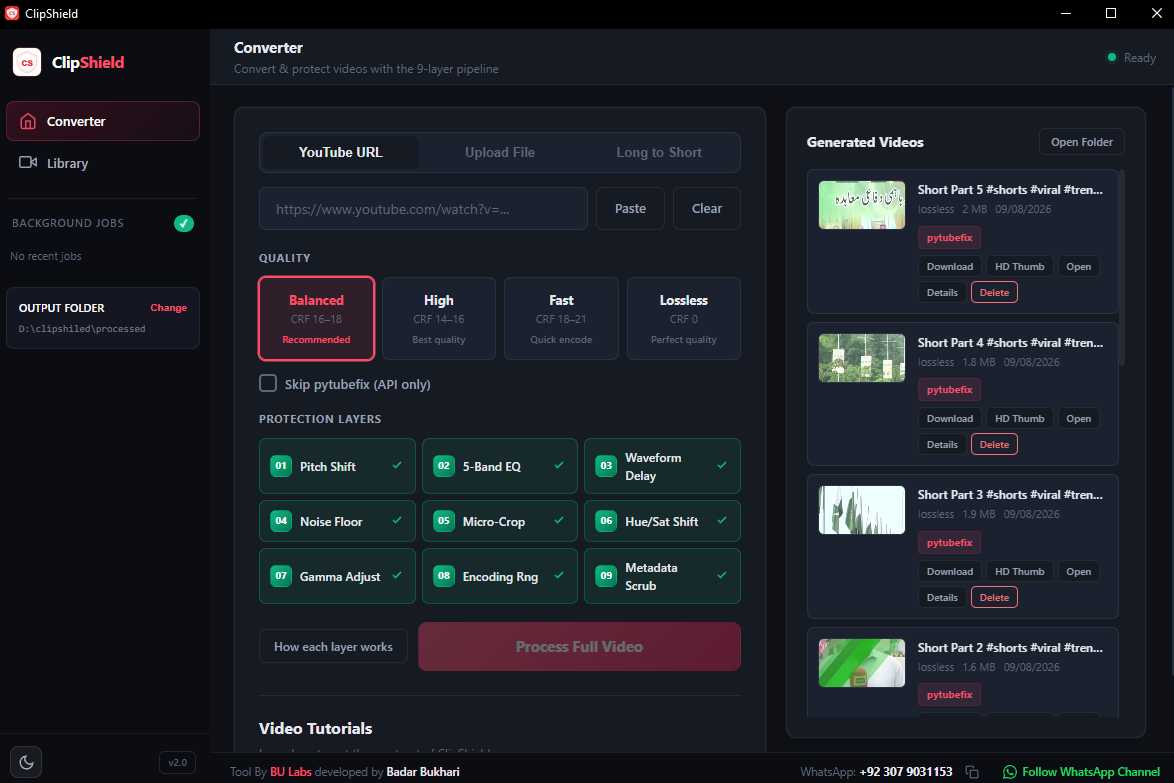
The ultimate desktop YouTube copyright claim removal tool. Download HD streams, select hooks using AI, reframe via OpenCV face-tracking, and erase copyright claims dynamically with a 9-layer local protection pipeline.
Bypasses Content ID filters & Copyright Match tools, trusted by creators at
ClipShield modifies structural parameters, visual footprints, and sound wave frequencies to ensure upload files bypass matching scrapers.
Pasting a URL initiates a downloader context rotation strategy (spoofing Web, Android, and Android VR clients). This retrieves high-definition adaptive video streams directly without rate-limiting blocks or IP bans.
pytubefix · yt-dlp android context · adaptive mergeThe software pulls timestamped video scripts. It queries Groq's low-latency cloud endpoint (Llama 3.1 8B, falling back to Cerebras 120B) to parse conversational pacing and isolate viral hooks, emotional peaks, or standalone insights.
Groq Llama-3.1-8b · Cerebras Fallback · youtube-transcript-apiRather than centering a vertical crop box blindly and cutting out speakers, ClipShield samples keyframes, runs OpenCV Haar Cascade face detection, and coordinates median horizontal offsets to keep speakers dynamically in focus.
OpenCV Haar Cascade · Median Horizontal CenteringThe video clip is routed through a randomized bypass grid. Filter scripts shift audio pitch, balance frequencies, offset stereo delays, sub-pixel crop margins, adjust luma, and inject metadata signatures of editing apps (Adobe Premiere Pro, CapCut, iMovie).
FFmpeg Filters · Metadata Spoofing · GOP Compression ScrambleAll filters execute in a single integrated FFmpeg command line pass, ensuring maximum speed. The renderer applies web-optimized `+faststart` metadata placement to enable instant buffering and saves local `.meta.json` specifications for easy indexing.
libx264 Encode · faststart metadata · Web-optimized outputWatch a complete walkthrough of ClipShield in action, explaining how to configure the copyright removal settings and start converting video clips.
Paste a YouTube URL to split viral moments dynamically, or drag-and-drop local MP4/MKV files directly into the converter dashboard screen.
Configure the active bypass layers (EQ adjustments, video resizing, pitch shift, meta signatures) or select from prebuilt automated presets matching your upload target.
Click "Convert" and let the local compiler render your unique bypass MP4 file. The generated vertical output is fully ready for Content ID clean uploads.
ClipShield is built for content creators who need to repurpose video materials without triggering claim flags or upload warnings.
Unlike online video copyright claims cleaners that require you to upload heavy files to their servers, ClipShield executes the entire downloading, face-tracking, and rendering logic locally on your CPU/GPU.
Every single render is completely unique. ClipShield incorporates a dynamic randomized seed generator. No two processed MP4 files share identical visual pixels, audio waveforms, frequency histograms, or video file hashes.
ClipShield downloads local transcripts and processes semantic segment selections via lightning-fast Groq APIs (Llama 3.1 8B) and Cerebras systems, avoiding the slow, heavy, local transformer models.
ClipShield applies multiple non-destructive audio and visual filters to dismantle fingerprint footprints analyzed by Content ID trackers.
Alters speech/audio pitch dynamically between -1.5 and +1.5 semitones to break database voice signatures.
Shifts gains on 5 bands (80Hz, 400Hz, 2kHz, 8kHz, 15kHz) to break acoustic profile matches.
Creates a subtle micro-second phase delay mismatch between left and right channels.
Crops a microscopic border (1-3px) from a random side, shifting canvas bounding coordinate hashes.
Scales cropped frames back to target vertical HD dimensions, forcing a complete pixel interpolation.
Slightly adjusts hue degrees and saturation levels to break standard color-matrix scanning.
Alters luminance mid-tones by minor deltas to disrupt light/shadow contrast templates.
Injects a silent white noise floor (-68dB to -62dB) into the spectrogram to erase audio signature patterns.
Strips camera and source history markers, injection tags (mimicking CapCut/iMovie), and alters GOP size.
ClipShield combines lightweight front-end logic with high-performance desktop processing frameworks.
| Runtime System | Python 3.12+ / PyWebView Core |
| Video Editor Base | FFmpeg / FFprobe (H.264 Encoder) |
| Face Tracking | OpenCV (cv2) Haar Cascades Model |
| Inference Engines | Groq Cloud (Llama 3.1 8B Instant) |
| LLM Fallback Node | Cerebras (gpt-oss-120b) |
| Downloader Engine | pytubefix / Custom yt-dlp wrapper |
| Data Registration | Local JSON Registry (.meta.json) |
Unlike unstable copyright remover browser bookmarklets or online page erasers that frequently go offline, ClipShield contains robust local programmatic fallbacks:
When pyTube contexts throw rate-limit boundaries, the scraper automatically routes streams through three fallback layers of yt-dlp players.
If YouTube subtitle scrapers are blocked, yt-dlp retrieves subtitle assets. If none exist, the app splits the video into equal hooks dynamically.
If Groq cloud services report connection limits, all transcripts are sent to Cerebras endpoints instantly to isolate viral timeline marks.
ClipShield operates with a secure motherboard-tied hardware signature (HWID) lock. Acquire a lifetime license key to remove claims on unlimited video files locally.
Every download includes a 1-video evaluation license. Use your app settings modal to generate and copy your motherboard ID.
Got questions about how our YouTube copyright claims bypass tool works? Find answers below.
YouTube Studio's built-in tool forces you to either erase the audio track completely (muting speech), replace it with generic audio library tunes, or trim out the segment entirely, which breaks the flow of your video. ClipShield works in advance of upload—applying microscopic, randomized pitch, luma, and pixel edits to make the video footprint unrecognizable to Content ID databases while preserving high-quality audio and visuals.
No. You can customize the active bypass modules directly from the ClipShield dashboard interface. If a video only has audio claim risks, you can disable the visual layers (Gamma, Hue, scaling) to save processing speeds and only run the sound scramblers.
ClipShield renders using customizable Constant Rate Factors (CRF). Select the "Balanced" preset for a recommended encoding speed and quality ratio, or choose "High Quality" preset (CRF 14-16) to output vertical clips that appear visually identical to the original HD file.
Yes. Online copyright removers force you to upload your raw assets to public third-party servers, which exposes your content and is extremely slow. ClipShield is a native desktop application that installs directly onto your machine, processing and rendering all files locally and keeping your data private.